 Pagewren
Keeping memories · The Pagewren Journal
Baby scrapbook page ideas: give one small story a page
A baby scrapbook page can begin with one picture and the detail you would miss if it were gone. Choose the story first, then decide whether it needs one photo, a small sequence, or just words. These six page ideas work in a paper album or a digital baby book, without filling every space.
In this guide
Start with the photo-and-story pairing
If you are still choosing what to collect, use our baby memory book content checklist. This guide takes the next step: turning that material into a readable page. Keep the main picture easy to see, put the words beside or below it, and let the caption explain something the image cannot.
The pairings below use original Pagewren illustrations and fictional text. They are content sketches, not screenshots of the app or examples from a real family's book.
One photo, one detail outside the frame
Choose a picture with a clear subject. Use a short title and two or three sentences rather than a second description of what everyone can already see. Write who was there, what they said, or what happened just before the picture.
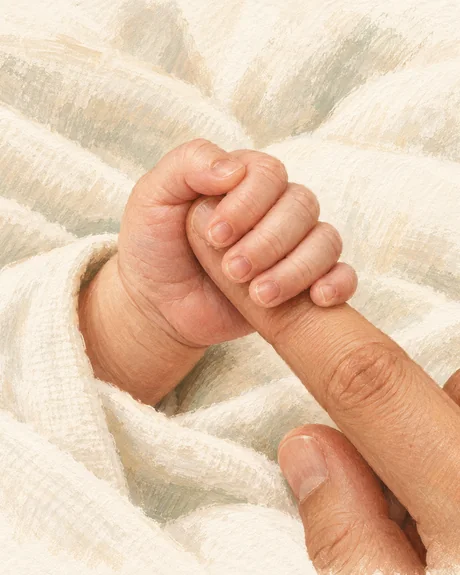
Photo + a short story
That little grip.
You held my finger while the kettle boiled. I let the tea go cold because I did not want to move.
The image holds the hand. The words keep the part outside the frame.
For a paper page, leave room around the caption before adding decorations. In a digital book, read the page at phone size: if the sentence is doing too many jobs, keep the detail you care about most.
A monthly portrait with an ordinary-day caption
A month label gives the page a place in the year. Add something particular to that day, rather than making a list of achievements. Clothes, a family phrase or the room in the background can be enough.
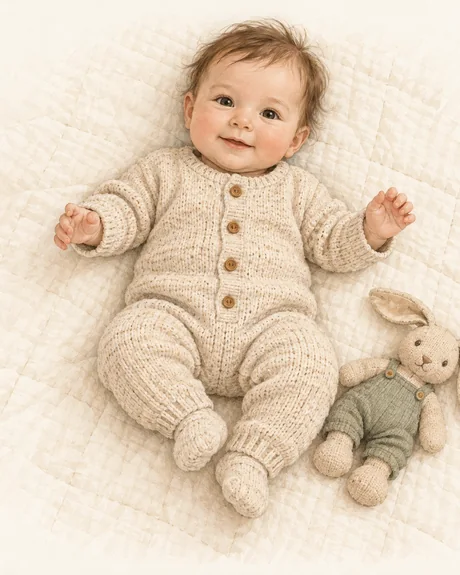
A month + a moment
This month, at home.
The cardigan from your aunt finally fits. Your brother calls it your going-out jumper, even when we are staying in.
A date can organize a page without turning it into a developmental checklist.
If you want a repeatable photo setup or a month card, the monthly baby photo guide has twelve options and links to the free card maker.
Two or three photos from the same afternoon
Choose a small sequence rather than three unrelated favorites. For example: arriving at a grandparent's house, a close-up of the hands greeting your baby, and everyone together before you leave. Let one caption connect the pictures.
Sunday at Grandma's. You arrived in the blue cardigan and went home wrapped in her spare blanket. Nobody remembered to take the biscuits out of the oven.
In a paper scrapbook, one larger image can lead the page and smaller ones can add context. For a digital book, select pictures from that same event and review how the app arranges them. You do not need a collage editor to tell a short sequence.
A whole page for a funny saying
Some stories have no photograph. Give the words their own space, include who said them, and add the date if you know it. For a baby's first year, it might be something a sibling or grandparent said about the baby.
“Can we keep the baby forever, or is this just for the weekend?”
Your brother, on the drive home.
Keep the wording as you remember it. An honest note such as “something like this” is better than polishing a fuzzy memory into an exact quotation.
A page for the person behind the camera
Choose a picture with the person who usually takes them. Pair it with a specific thing they do: the song they repeat, the walk they take, or the way they always pack an extra cardigan. A name and a small habit make a stronger page than a general tribute.
Leave room for their own sentence if they would like to contribute. In Pagewren, someone can send you words or a picture to add yourself; the app does not offer shared editing of one book.
A letter beside one year-end picture
Choose a picture from the end of the year and write to your child, rather than trying to summarize every month. Mention an ordinary moment you hope to remember and something you wonder about their future. Longer words can have a page of their own.
Our letters to your baby guide has a simple structure and three original examples. A short note can close the book without pretending the story is finished.
Make one page before choosing the whole style
Try one photo and one paragraph first. In Pagewren for iPhone, you add photos and your own text; page templates arrange the memories into a book. It is not a freeform scrapbook design canvas, and these website sketches are not selectable templates.
The Classic theme and Classic PDF export are free. Linen and Scrapbook themes, along with exports in those themes, are part of Pagewren Pro. Pick the content you want to keep before deciding on a theme. You can share a page image or export a PDF and arrange printing independently.